CloudFront and WAF Security
Stream AWS WAF and CloudFront logs into RawTree for real-time security and traffic analytics.
CloudFront and WAF Security
This example streams security and traffic events from an AWS CloudFront distribution protected by AWS WAF into RawTree.
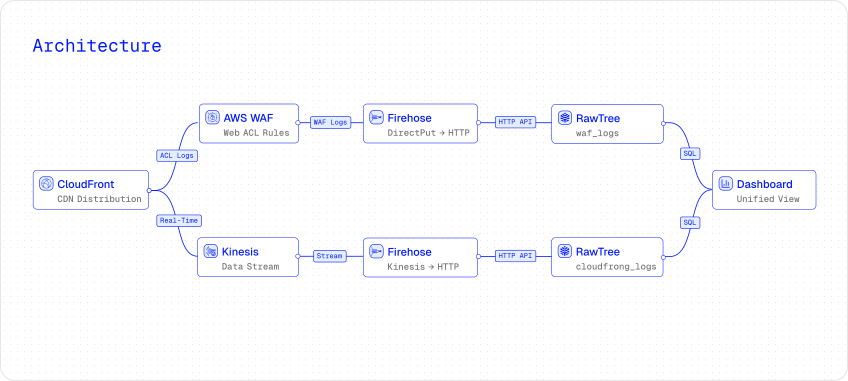 WAF logs land in one table for security analysis, while CloudFront real-time logs land in another table for traffic health, latency, cache, and status-code analysis.
Use the Showroom version for the curated dashboard and live walkthrough.
What this demonstrates
- WAF logs for blocked IPs, terminating rules, attack categories, and geo-distribution.
- CloudFront real-time logs for cache hit ratio, latency percentiles, status codes, bandwidth, and edge locations.
- Separate RawTree tables for security and traffic signals.
- Terraform-managed Firehose, Kinesis, IAM, S3 backup buckets, and logging configuration.
- A unified dashboard over both data sources.
1. Prerequisites
You need an existing CloudFront distribution with a WAFv2 Web ACL attached. The RawTree Terraform provider provisions the ingestion infrastructure around those existing resources.
2. Configure credentials
Set your RawTree credentials as environment variables. The AWS provider uses your default AWS credentials or AWS_PROFILE.
export RAWTREE_API_KEY="rt_..."
export RAWTREE_ORG="your-org"
export RAWTREE_DATABASE="your-database"
3. Deploy with Terraform
Create a main.tf with both ingestion resources. rawtree_waf_ingestion sends WAF logs to waf_logs; rawtree_cloudfront_ingestion sends CloudFront real-time logs to cloudfront_logs.
terraform {
  required_providers {
    aws     = { source = "hashicorp/aws", version = "~> 5.0" }
    rawtree = { source = "rawtreedb/rawtree" }
  }
}

provider "aws" { region = "us-east-1" }
provider "rawtree" {}

variable "web_acl_arn"     { type = string }
variable "distribution_id" { type = string }

resource "rawtree_waf_ingestion" "waf" {
  table       = "waf_logs"
  web_acl_arn = var.web_acl_arn
  region      = "us-east-1"
}

resource "rawtree_cloudfront_ingestion" "cf" {
  table           = "cloudfront_logs"
  distribution_id = var.distribution_id
  region          = "us-east-1"
}
4. Apply
Terraform creates the delivery infrastructure for each pipeline: IAM roles and policies, Firehose streams, Kinesis stream for CloudFront, S3 backup buckets, CloudWatch log groups, WAF logging config, and CloudFront real-time log config.
terraform init
terraform apply \
  -var web_acl_arn="arn:aws:wafv2:us-east-1:123456789:regional/webacl/my-acl/..." \
  -var distribution_id="E1ABCDEF123456"
5. Generate traffic
Send mixed legitimate and attack traffic to your CloudFront distribution. The traffic generator used by the Showroom lives in the Terraform provider repository under test/lab/.
# Mixed traffic: legitimate requests plus attacks.
./generate-traffic.sh your-distribution.cloudfront.net 20

# Legitimate traffic only.
./generate-traffic.sh your-distribution.cloudfront.net 100 --legit

# Heavy attack traffic.
docker run --rm wallarm/gotestwaf \
  --url https://your-distribution.cloudfront.net \
  --skipWAFBlockCheck
6. Verify in RawTree
Wait 1-2 minutes for Firehose to deliver the first batches, then query both tables.
rtree query "SELECT count() FROM waf_logs"
rtree query "SELECT count() FROM cloudfront_logs"
Inspect recent WAF decisions:
SELECT action, terminatingRuleId, count() AS events
FROM waf_logs
GROUP BY action, terminatingRuleId
ORDER BY events DESC
LIMIT 20
Inspect CloudFront status codes:
SELECT sc_status, count() AS requests
FROM cloudfront_logs
GROUP BY sc_status
ORDER BY requests DESC
LIMIT 20
7. Open the dashboard
Create a read-only API key for the dashboard:
curl -fsSL https://rawtree.com/install.sh | bash
rtree login
rtree key create --name waf-dashboard --permission read
Then open the Showroom dashboard. You should see WAF decisions, status codes, cache performance, and attack patterns populate in real time.