Adaptive compression codec
by Maksim Kita
Motivation
One of the most important things that drives columnar analytical database performance is reducing the amount of IO compared to row-based databases. During typical read queries, the system reads only the necessary columns from disk. Storing data in columns also lets the system process it using vectorized instructions, and compression ratios are much better because similar data lies together on disk.
Typically when you choose a compression codec there is a tradeoff between compression/decompression speed and compression ratio. Right now there are 2 common choices for general purpose compression codecs that do not know anything about your data structure:
LZ4 offers a good compression ratio with good compression speed and very high decompression speed. ZSTD offers a better compression ratio than LZ4 with lower compression/decompression speed, but performance is still very good for modern systems. Compression codec performance should not be the bottleneck in your data processing pipeline, which is why compression/decompression speed is very important. Compression ratio is equally important not only because less data will be stored physically, but also because less data will be transferred from disk or over the network, which allows queries to execute much faster.
RawTree's goal is not to ask users to choose codecs manually. The database should observe column data, test candidates, and store each column with the best strategy automatically.
Initially all data in RawTree was compressed with ZSTD by default. But ZSTD does not know anything about your concrete data structure and types, so it is possible that specialized encoding strategies like Delta, Double Delta, T64 for Integer values, Gorilla, FPC, ALP for Floats or Dictionary encoding for Strings will provide much better compression ratios and compression/decompression speed. You can read more about specialized encoding strategies in DuckDB blog post lightweight compression.
There are multiple problems with specialized codecs:
- How to choose a codec without requiring the user to specify it upfront. In RawTree we want everything to be automated so the database adjusts to your data using offline statistics, runtime statistics and actual queries.
- Most specialized codecs are useless, when used in generic scenarios. So they can introduce additional performance degradation on compression/decompression paths in your system without providing any improvements to compression ratio.
Design
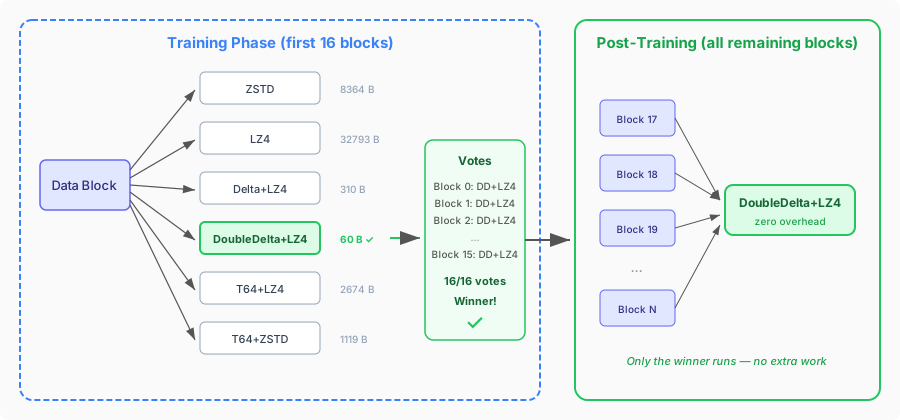
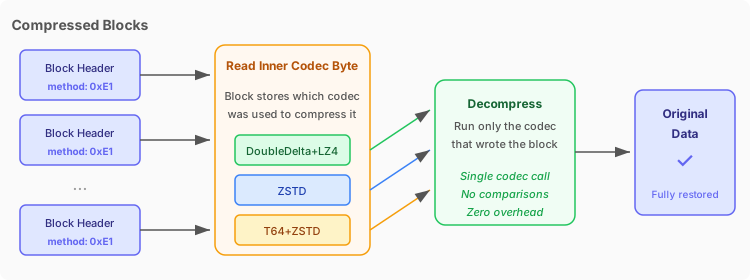
We developed the Adaptive compression codec, which runs multiple compression codecs on samples of your data to choose the best compression codec for your specific column data with almost zero overhead on
compression path and zero overhead on decompression path.
Compression stage:
Decompression stage:
Example: integers
Let's start with demo to understand when Adaptive codec can provide significant benefits. Consider we have sorted sequential Integer data.
First let's set up a table with ZSTD compression codec:
CREATE TABLE test_table_zstd
(
    `id` UInt64 CODEC(ZSTD),
    `value` UInt64 CODEC(ZSTD)
)
ENGINE = MergeTree
ORDER BY id;
Now let's ingest 100 million integers and measure ingest time:
INSERT INTO test_table_zstd SELECT number, number FROM numbers(100000000);

100000000 rows in set. Elapsed: 5.587 sec. Processed 100.00 million rows, 800.00 MB (17.90 million rows/s., 143.19 MB/s.)
Peak memory usage: 48.72 MiB.
Let's optimize table to have single part and now we can understand how much data is stored:
OPTIMIZE TABLE test_table_zstd;

SELECT COUNT() AS parts, formatReadableSize(sum(bytes_on_disk)) AS size FROM system.parts
WHERE active = 1 AND table = 'test_table_zstd'

┌─parts─┬─size───────┐
│     1 │ 195.11 MiB │
└───────┴────────────┘
Let's also query data when data is in page cache to understand decompression speed:
SELECT * FROM test_table_zstd FORMAT Null;

0 rows in set. Elapsed: 0.094 sec. Processed 100.00 million rows, 1.60 GB (1.07 billion rows/s., 17.08 GB/s.)
Peak memory usage: 94.79 MiB.
Now let's do the same with Adaptive codec:
CREATE TABLE test_table_adaptive
(
    `id` UInt64 CODEC(Adaptive),
    `value` UInt64 CODEC(Adaptive)
)
ENGINE = MergeTree
ORDER BY id
Now let's ingest 100 million integers and measure ingest time:
INSERT INTO test_table_adaptive SELECT number, number FROM numbers(100000000);

100000000 rows in set. Elapsed: 2.573 sec. Processed 100.00 million rows, 800.00 MB (38.86 million rows/s., 310.90 MB/s.)
Peak memory usage: 48.49 MiB.
Let's optimize table to have single part and now we can understand how much data is stored:
OPTIMIZE TABLE test_table_adaptive;

SELECT COUNT() AS parts, formatReadableSize(sum(bytes_on_disk)) AS size FROM system.parts
WHERE active = 1 AND table = 'test_table_adaptive'

┌─parts─┬─size─────┐
│     1 │ 2.02 MiB │
└───────┴──────────┘
Let's also query data when data is in page cache to understand decompression speed:
SELECT * FROM test_table_adaptive FORMAT Null

0 rows in set. Elapsed: 0.055 sec. Processed 100.00 million rows, 1.60 GB (1.81 billion rows/s., 28.95 GB/s.)
Peak memory usage: 69.47 MiB.
On this sorted integer benchmark, we store 2.02 MiB with Adaptive codec and 195.11 MiB with ZSTD codec. That is almost a 100x difference. We can also see that ingestion
performance is more than 2 times faster and read performance is almost 2 times faster. Let's dive deeper to understand which particular combination Adaptive codec chose for this data.
Here are some internal logs of Adaptive codec. Parameters like the amount of training blocks and the set of different candidates can be configured in table settings.
Training blocks seen: 16
Analysis of block 0
Candidate index 0 description: ZSTD size: 8364 elapsed compression time: 0.000229055
Candidate index 1 description: LZ4 size: 32793 elapsed compression time: 9.3393e-05
Candidate index 2 description: Delta+LZ4 size: 310 elapsed compression time: 1.5212e-05
Candidate index 3 description: DoubleDelta+LZ4 size: 60 elapsed compression time: 1.2311e-05
Candidate index 4 description: T64+LZ4 size: 2674 elapsed compression time: 5.6328e-05
Candidate index 5 description: T64+ZSTD size: 1119 elapsed compression time: 8.1031e-05
Block index 0 winner index 3 description: DoubleDelta+LZ4

...

Analysis of block 15
Candidate index 0 description: ZSTD size: 8364 elapsed compression time: 0.000182632
Candidate index 1 description: LZ4 size: 32800 elapsed compression time: 9.1974e-05
Candidate index 2 description: Delta+LZ4 size: 310 elapsed compression time: 1.3767e-05
Candidate index 3 description: DoubleDelta+LZ4 size: 60 elapsed compression time: 1.1391e-05
Candidate index 4 description: T64+LZ4 size: 2548 elapsed compression time: 5.4021e-05
Candidate index 5 description: T64+ZSTD size: 894 elapsed compression time: 6.6441e-05
Block index 15 winner index 3 description: DoubleDelta+LZ4

Best candidate index: 3 description: DoubleDelta+LZ4
String complexity
With Strings everything is much more complex. RawTree inherits ClickHouse codecs interfaces and ICompressionCodec:
class ICompressionCodec : private boost::noncopyable
{
public:
    ...

    /// Compressed bytes from uncompressed source to dest. Dest should preallocate memory
    UInt32 compress(const char * source, UInt32 source_size, char * dest) const;

    ...
};
For fixed size types like Integers and Floats, a codec can get information about the type during registration. This is how, for example, codec Adaptive registration looks:
void registerCodecAdaptive(CompressionCodecFactory & factory)
{
    factory.registerCompressionCodecWithType(
        "Adaptive",
        static_cast<UInt8>(CompressionMethodByte::Adaptive),
        [](const ASTPtr & /*arguments*/, const IDataType * column_type) -> CompressionCodecPtr
        {
            auto codecs = buildCandidates(column_type);
            return std::make_shared<CompressionCodecAdaptive>(std::move(codecs));
        });
}
You can see that the column_type argument is used in the buildCandidates method. But for variable length types like Strings this approach does not work. We need to know String boundaries to
be able to apply specialized compression codecs that can be more efficient than ZSTD. For example, we can use Dictionary encoding when values have low cardinality before applying ZSTD compression.
That pattern is common in semi-structured data: route names, status codes, user agents, countries, currencies, event types, and other enum-like values often arrive as Strings. If the database can recognize and compress those columns efficiently, users do not need to model them manually first. There are 3 possible approaches:
- Try to extend
ICompressionCodecinterface, so that codec will understand some hints about the data that it compresses. - Perform such optimization on another level, for example on Serialization level where there is more information about concrete columns structure.
- Perform such optimizations even on a higher level than Serialization level, allowing to automatically convert
Stringcolumns toLowCardinality(String)type.
In RawTree we decided to go with approach number one. The main motivation was that we want to explore different String codecs in isolation similar to how architecture looks for Integers. So we extended interface with such method:
class ICompressionCodec : private boost::noncopyable
{
public:
    ...

    /// Compress with optional string element sizes as hints.
    /// string_sizes points to an array of element sizes covering strings_count
    /// strings in source. Codecs that don't use string sizes ignore this.
    UInt32 compress(const char * source, UInt32 source_size, char * dest,
                    const uint64_t * string_sizes, size_t strings_count) const;

    ...
};
There are multiple technical details to such approach that are out of scope for this blog post, for example how this should work with Compact parts, what happens when buffer is flushed on string boundary, etc. The main thing is that now we are able to apply specialized codecs to String compression and that was our goal.
Example: strings
Let's create table with ZSTD codec:
CREATE TABLE test_table_zstd
(
    `id` String CODEC(ZSTD)
)
ENGINE = MergeTree
Let's insert 100 million rows with 10 unique key values for id column:
INSERT INTO test_table_zstd SELECT 'Key_' || toString(rand64() % 10) FROM numbers(100000000);

100000000 rows in set. Elapsed: 5.942 sec. Processed 100.00 million rows, 800.00 MB (16.83 million rows/s., 134.64 MB/s.)
Peak memory usage: 45.93 MiB.
Let's optimize table to have single part and now we can understand how much data is stored:
OPTIMIZE TABLE test_table_zstd;

SELECT COUNT() AS parts, formatReadableSize(sum(bytes_on_disk)) AS size FROM system.parts
WHERE active = 1 AND table = 'test_table_zstd'

┌─parts─┬─size──────┐
│     1 │ 97.67 MiB │
└───────┴───────────┘
Let's also query data when data is in page cache to understand decompression speed:
SELECT * FROM test_table_zstd FORMAT Null

0 rows in set. Elapsed: 0.106 sec. Processed 100.00 million rows, 799.82 MB (947.19 million rows/s., 7.58 GB/s.)
Peak memory usage: 115.13 MiB.
Now let's create table with Adaptive codec:
CREATE TABLE test_table_adaptive
(
    `id` String CODEC(Adaptive)
)
ENGINE = MergeTree
Let's insert 100 million rows with 10 unique key values for id column:
INSERT INTO test_table_adaptive SELECT 'Key_' || toString(rand64() % 10) FROM numbers(100000000);

100000000 rows in set. Elapsed: 3.921 sec. Processed 100.00 million rows, 800.00 MB (25.51 million rows/s., 204.04 MB/s.)
Peak memory usage: 45.96 MiB.
Let's optimize table to have single part and now we can understand how much data is stored:
OPTIMIZE TABLE test_table_adaptive;

SELECT COUNT() AS parts, formatReadableSize(sum(bytes_on_disk)) AS size FROM system.parts
WHERE active = 1 AND table = 'test_table_adaptive'

┌─parts─┬─size──────┐
│     1 │ 43.66 MiB │
└───────┴───────────┘
Let's also query data when data is in page cache to understand decompression speed:
SELECT * FROM test_table_adaptive FORMAT Null

0 rows in set. Elapsed: 0.051 sec. Processed 100.00 million rows, 799.82 MB (1.96 billion rows/s., 15.67 GB/s.)
Peak memory usage: 35.55 MiB.
On this low-cardinality string benchmark, we store 43.66 MiB with Adaptive codec and 97.67 MiB with ZSTD codec. That is almost a 2x difference in compression ratio. We can also see that ingestion
performance is 34% faster and read performance is 2 times faster.
Example: ClickBench hits dataset
Let's take a real world dataset and check how much Adaptive codec can help. I created 2 tables with this structure: one table named
hits_zstd with ZSTD compression codec for all columns and another table named hits_adaptive with Adaptive compression codec for all columns. I inserted the hits dataset and optimized both tables to have only a single part.
With such query we can see for which columns we have improvement or degradation in compression higher than 5%.
SELECT
    l.name,
    formatReadableSize(l.size) AS zstd_size,
    formatReadableSize(r.size) AS adaptive_size,
    round((1 - (r.size / l.size)) * 100, 1) AS improvement_pct
FROM
(
    SELECT
        name,
        data_compressed_bytes AS size
    FROM system.columns
    WHERE `table` = 'hits_zstd'
) AS l
INNER JOIN
(
    SELECT
        name,
        data_compressed_bytes AS size
    FROM system.columns
    WHERE `table` = 'hits_adaptive'
) AS r ON l.name = r.name
WHERE abs(1 - (r.size / l.size)) > 0.05
ORDER BY improvement_pct DESC

┌─name────────────────┬─zstd_size──┬─adaptive_size─┬─improvement_pct─┐
│ ParamCurrency       │ 24.78 MiB  │ 1000.19 KiB   │            96.1 │
│ HitColor            │ 30.57 MiB  │ 6.85 MiB      │            77.6 │
│ BrowserLanguage     │ 46.15 MiB  │ 11.17 MiB     │            75.8 │
│ PageCharset         │ 34.78 MiB  │ 9.41 MiB      │            72.9 │
│ IsArtifical         │ 7.43 MiB   │ 3.40 MiB      │            54.3 │
│ JavaEnable          │ 11.10 MiB  │ 5.93 MiB      │            46.5 │
│ SilverlightVersion2 │ 10.68 MiB  │ 5.75 MiB      │            46.2 │
│ FlashMinor2         │ 59.38 MiB  │ 33.55 MiB     │            43.5 │
│ IsRefresh           │ 6.72 MiB   │ 3.82 MiB      │            43.2 │
│ BrowserCountry      │ 61.64 MiB  │ 35.56 MiB     │            42.3 │
│ IsMobile            │ 5.80 MiB   │ 3.49 MiB      │            39.9 │
│ MobilePhoneModel    │ 4.65 MiB   │ 2.80 MiB      │            39.7 │
│ UserAgentMinor      │ 68.95 MiB  │ 45.00 MiB     │            34.7 │
│ Params              │ 2.61 MiB   │ 1.80 MiB      │              31 │
│ UTMSource           │ 2.20 MiB   │ 1.56 MiB      │            29.1 │
│ UTMMedium           │ 2.11 MiB   │ 1.51 MiB      │            28.4 │
│ Income              │ 16.03 MiB  │ 11.50 MiB     │            28.2 │
│ FromTag             │ 1.32 MiB   │ 992.84 KiB    │            26.3 │
│ Sex                 │ 15.64 MiB  │ 11.96 MiB     │            23.6 │
│ OpenstatServiceName │ 541.15 KiB │ 416.99 KiB    │            22.9 │
│ UTMCampaign         │ 3.00 MiB   │ 2.33 MiB      │            22.1 │
│ ResponseEndTiming   │ 46.72 MiB  │ 36.80 MiB     │            21.2 │
│ OpenstatCampaignID  │ 1.08 MiB   │ 890.03 KiB    │            19.4 │
│ SearchEngineID      │ 14.65 MiB  │ 11.89 MiB     │            18.8 │
│ ResponseStartTiming │ 54.63 MiB  │ 44.54 MiB     │            18.5 │
│ OS                  │ 18.11 MiB  │ 15.26 MiB     │            15.7 │
│ SendTiming          │ 13.22 MiB  │ 11.17 MiB     │            15.5 │
│ ConnectTiming       │ 15.77 MiB  │ 13.45 MiB     │            14.7 │
│ DNSTiming           │ 4.94 MiB   │ 4.22 MiB      │            14.5 │
│ FetchTiming         │ 24.85 MiB  │ 21.93 MiB     │            11.7 │
│ TraficSourceID      │ 26.25 MiB  │ 23.31 MiB     │            11.2 │
│ Robotness           │ 21.44 MiB  │ 19.51 MiB     │               9 │
│ UTMContent          │ 442.62 KiB │ 404.05 KiB    │             8.7 │
│ OpenstatSourceID    │ 1.10 MiB   │ 1.05 MiB      │             5.1 │
│ JavascriptEnable    │ 486.05 KiB │ 510.87 KiB    │            -5.1 │
│ SilverlightVersion4 │ 50.08 KiB  │ 52.74 KiB     │            -5.3 │
│ WithHash            │ 394.27 KiB │ 419.26 KiB    │            -6.3 │
│ CookieEnable        │ 390.65 KiB │ 415.61 KiB    │            -6.4 │
│ SocialNetwork       │ 23.99 KiB  │ 26.63 KiB     │             -11 │
│ SocialAction        │ 23.99 KiB  │ 26.63 KiB     │             -11 │
│ HTTPError           │ 23.99 KiB  │ 26.63 KiB     │             -11 │
│ IsEvent             │ 23.99 KiB  │ 26.63 KiB     │             -11 │
│ EventDate           │ 193.94 KiB │ 218.98 KiB    │           -12.9 │
│ CounterID           │ 284.34 KiB │ 331.82 KiB    │           -16.7 │
│ CounterClass        │ 133.40 KiB │ 158.32 KiB    │           -18.7 │
│ OpenerName          │ 248.28 KiB │ 295.81 KiB    │           -19.1 │
│ GoodEvent           │ 128.55 KiB │ 153.42 KiB    │           -19.4 │
└─────────────────────┴────────────┴───────────────┴─────────────────┘
The degradation is very small in absolute values and only for very small columns because we store a small amount of additional header data for Adaptive
compression codec to dispatch to the underlying codec during decompression. The most interesting are the first 10 low-cardinality String columns:
┌─name────────────────┬─zstd_size─┬─adaptive_size─┬─improvement_pct─┐
│ ParamCurrency       │ 24.78 MiB │ 1000.19 KiB   │            96.1 │
│ HitColor            │ 30.57 MiB │ 6.85 MiB      │            77.6 │
│ BrowserLanguage     │ 46.15 MiB │ 11.17 MiB     │            75.8 │
│ PageCharset         │ 34.78 MiB │ 9.41 MiB      │            72.9 │
│ IsArtifical         │ 7.43 MiB  │ 3.40 MiB      │            54.3 │
│ JavaEnable          │ 11.10 MiB │ 5.93 MiB      │            46.5 │
│ SilverlightVersion2 │ 10.68 MiB │ 5.75 MiB      │            46.2 │
│ FlashMinor2         │ 59.38 MiB │ 33.55 MiB     │            43.5 │
│ IsRefresh           │ 6.72 MiB  │ 3.82 MiB      │            43.2 │
│ BrowserCountry      │ 61.64 MiB │ 35.56 MiB     │            42.3 │
└─────────────────────┴───────────┴───────────────┴─────────────────┘
For ParamCurrency we have 25.4x better compression ratio. If we query this column we can see around 2x performance improvement:
SELECT ParamCurrency FROM hits_zstd FORMAT Null

0 rows in set. Elapsed: 0.097 sec. Processed 100.00 million rows, 599.88 MB (1.03 billion rows/s., 6.20 GB/s.)
Peak memory usage: 78.59 MiB.
SELECT ParamCurrency FROM hits_adaptive FORMAT Null
0 rows in set. Elapsed: 0.048 sec. Processed 100.00 million rows, 599.88 MB (2.07 billion rows/s., 12.40 GB/s.)
Peak memory usage: 39.56 MiB.Here are the final sizes of both tables:
SELECT COUNT() AS parts, formatReadableSize(sum(bytes_on_disk)) AS size FROM system.parts
WHERE active = 1 AND table = 'hits_zstd'

┌─parts─┬─size─────┐
│     1 │ 9.51 GiB │
└───────┴──────────┘
SELECT COUNT() AS parts, formatReadableSize(sum(bytes_on_disk)) AS size FROM system.parts
WHERE active = 1 AND table = 'hits_adaptive'
┌─parts─┬─size─────┐
│ 1 │ 9.19 GiB │
└───────┴──────────┘Overall there is a 3.4% win in compression ratio for the whole ClickBench hits dataset in this run.
Example: New York taxi dataset
We can download a small version of the dataset in RawTree using this command.
CREATE TABLE nyc_taxi_zstd ENGINE=RawMergeTree;
INSERT INTO nyc_taxi_zstd SELECT * FROM url('https://storage.googleapis.com/clickhouse-public-datasets/nyc-taxi/trips_{0..2}.gz', 'TabSeparatedWithNames')

OPTIMIZE TABLE nyc_taxi_zstd;

SELECT COUNT() AS parts, formatReadableSize(sum(bytes_on_disk)) AS size FROM system.parts
WHERE active = 1 AND table = 'nyc_taxi_zstd'

┌─parts─┬─size───────┐
│     1 │ 158.82 MiB │
└───────┴────────────┘
CREATE TABLE nyc_taxi_adaptive ENGINE=RawMergeTree;
INSERT INTO nyc_taxi_adaptive SELECT * FROM url('https://storage.googleapis.com/clickhouse-public-datasets/nyc-taxi/trips_{0..2}.gz', 'TabSeparatedWithNames')
OPTIMIZE TABLE nyc_taxi_adaptive;
SELECT COUNT() AS parts, formatReadableSize(sum(bytes_on_disk)) AS size FROM system.parts
WHERE active = 1 AND table = 'nyc_taxi_adaptive'
┌─parts─┬─size───────┐
│ 1 │ 123.50 MiB │
└───────┴────────────┘Overall there is a 22.2% win in compression ratio for this small New York taxi dataset sample.
Conclusion
The Adaptive codec automatically picks the best compression strategy for each column without any user configuration. In the benchmarks above:
- On sorted integer data, it stores 195 MiB as 2 MiB by selecting
DoubleDelta+LZ4. - On low-cardinality string columns like
ParamCurrency, it stores 24.78 MiB as 1000 KiB by applying Dictionary encoding. - On the integer and string examples above, reads are close to 2 times faster because there is less data on disk.
- On the small NYC taxi sample and ClickBench hits dataset runs above, it improves overall compression by 22.2% and 3.4% respectively.
Adaptive codec is one example of RawTree's broader design principle: users should not need to choose physical storage details up front. The system should test, measure, and adapt where it has enough evidence.
The goal of RawTree is to free users from thinking about Schema, Codecs, Primary Key, Materialized Views and other complex decisions. The database should adjust to your data automatically. In the future we want to improve String compression using more specialized codecs and explore other data compression techniques. Stay tuned.